Tuesday, June 30, 2009

Keeping Focus

I’m just back from a week of vacation at the beach. Very relaxing (except for having to get my presentations done for Emerson Exchange).

I got a call yesterday from one of my customers who’s just upgraded to version 10.3 of DeltaV. In case you haven’t heard, Emerson has equipped the new versions of control and recipe studio with Microsoft’s ribbon technology (ala Office 2007).

So Ray asks me “how do you know which control studio session has focus”? I hadn’t looked that close at 10.3 yet, but from past experience, the title bar at the top of the window is usually darker if that window has focus:

So I open up 10.3, launch three control studio windows, put them next to one another and damn if you can’t tell which one has focus:


Not a show stopper, but something to watch out for (BTW, the CS window in the upper left had focus).


Tuesday, June 16, 2009

Another 10.3 Nugget

Not everything that’s new in DeltaV version 10 is in the New Features section of the release notes – some new stuff is detailed in the Enhanced Functionality section.

Case in point – Linker utilities have been added to the batch toolbar to make linking the ActiveX buttons and lists in DeltaV Operate easy. Prior to version 10, a little under the hood magic was required to tie the objects together.

Just mouse over the buttons in the DeltaV Batch toolbar and you’ll notice the 3 new linker utilities:


Select the linker of your choice (below is the batch list control linker).


Be sure to select the linker after you’ve dropped the two items to be linked on the graphic – otherwise, you won’t be able to select them and complete the operation.

Wednesday, June 3, 2009

Shareware Behavior

The powerful little workhorses inside of the work instructions of Syncade are called “Behaviors”. I wondered where this terminology came from so I turned to the one true source of all knowledge on the Internet – Wikipedia. Once you wade through the animal and psychology sections, you get this definition:

Behavior as used in computer science is an anthropomorphic construct that assigns ‘life’ to the activities carried out by a computer, computer application, or computer code in response to stimuli, such as user input. Also, ‘a behavior’ is a reusable block of computer code or script that, when applied to an object (computer science), especially a graphical one, causes it to respond to user input in meaningful patterns or to operate independently”

Out of the RA (Recipe Authoring) box you get some behaviors as part of Syncade. You also get a nifty Behavior Editor program for developing your own. As part of our in-house development work with Syncade, Scott Thompson came up with a clever new behavior to generate an email REM_SIMPLE_EMAIL.

You could conditionally notify a supervisor his attention is need – based on events. You could generate the status of an order, from inside the order, to folks who aren’t normally monitoring the batch. You could automatically notify your local business partner to dispatch a site services engineer because of an equipment or instrumentation failure.

I think there’re so many uses, I’ve posted the behavior up on the acmebiotech.com web site and made it available as a shareware, as-is download. Follow this link to the page for both the behavior and detailed instructions.

If you like it (or hate it), tell Scott and I about it.

Monday, June 1, 2009

Remote Terminal Sessions with Monitor Spanning

Here’s another cool feature on DeltaV version 10 – maybe enough to get you to run right out and upgrade this week!

Version 10 now supports spanning monitors of DeltaV Operate on a remote terminal session. So for instance, if you connect to a remote session from any old PC with a couple of monitors attached, DeltaV Operate is smart enough to automatically give me a dual head session.

There are a couple of caveats:
  • The monitors have to be in the horizontal configuration
  • The maximum horizontal pixel width is 4096

The pixel width limitation means you can have 2 widescreen monitors side by side, or 3 1280x1024 monitors, or 4 1024x768 (but nobody uses that anymore, right?).

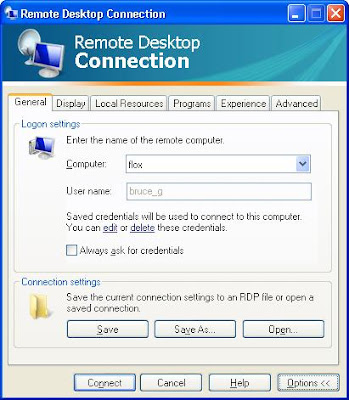
So you’re asking “Quick, tell me how to do this!” – It’s pretty easy. Most folks are familiar with the Remote Desktop Connection dialog box:


The thing is, there’s this /span option, and it’s not a selection as part of the Desktop dialog box. To use it, you need to use the mstsc command prompt. After creating the above .rdp file, you create a .bat file with the mstsc command:


By double clicking on the .rdp file, you get a single monitor session. Double clicking on the .bat file, you get a double wide!


Wednesday, May 27, 2009

Kit Bashing a DCS

So why is it that some third party integrators think they can build a better mousetrap? It’s one thing to go to Home Depot, buy a bunch of nails, screws, 2x4’s and build you a storage shed. And if you want to “kit bash” a prebuilt shed by adding a bay window, that’s cool, but be real careful turning around and trying to resell your new and improved shed if you haven’t taken into account the structural implications of that window.

And while the conversion van business has been around for a long time and has done well, I can’t say the same for the DCS “kit bashing” I’ve seen. Four times now I’ve had customers get caught in one of these “better” mousetraps, kit bashed from various control systems. The integrators don’t have a dog in the fight so it’s really easy for them to blame, after the fact of course, the hardware platform or system level software.

So the options to the end user are usually to do a major rewrite or hope and pray that hardware platform enhancements (faster processors, more memory) will somehow come to the rescue.

Be wary of someone pitching a DCS agnostic package that will have the same look and feel whether you use, for example, DeltaV or a SLC 5/05. Chances are if it sounds too good to be true, it probably is.

Friday, May 15, 2009

UGOC 2009 Day 2

What a turn out yesterday! We had over 100 customers pack our campus. The most popular presentations were our wireless talks and Syncade – it was standing room only when Scott Thompson and I presented our Syncade in Depth talk.

One of the big hits during the product showcase was Dick Beverly from Emerson ASCO Numatics showing off their line of smart valve manifolds/remote IO. And I do mean smart. Not only do they handle analog and discrete signals in addition to the manifold outputs, talk all the major busses including Foundation Fieldbus and Ethernet, but their DeviceNet version supports a DeviceLogix module, allowing high speed (5 ms) function block or ladder logic.

I’m excited about now being able to offer a one stop shopping controls and automation solution. For example, handling high speed valve sequencing around the bowl of a centrifuge in addition to all the other required skid batch automation is now possible as part of a total Emerson solution.

Thursday, May 14, 2009

UGOC 2009 Day 1


So yesterday was Day 1 of the 2009 version of the User Group of the Carolinas get together. Attendance was on par with previous years for the first half day session.

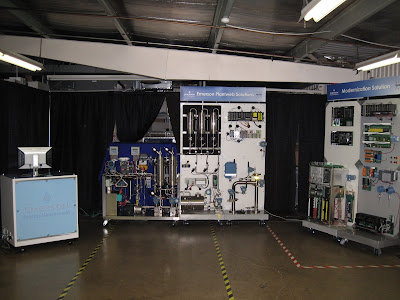
One of this year’s cool attractions is the Emerson Wall – it’s a 20 foot long PlantWeb dreamscape with enough eye candy to keep folks coming back. Al Lee and Gordon Lawther from Emerson are here to put it through its paces.


Today should be a big day with most of our 120 plus attendees showing up. I’ll have more pictures and comments tomorrow.

Thursday, May 7, 2009

Cold Enough For Ya?

So in preparing for the 2009 version of our UGOC (User Group of the Carolinas), I came across an interesting new nugget in DeltaV version 10.3. Interesting because it’s not documented in the Release Notes.

So now there’s a new drop down menu on the Controller tab of a controller node for additional selections of Cold Restart. "Always Disabled" is really no different than setting the timer to 0. "Enabled Within A Time Limit" allows you to set the time (no difference than now). The new choice is the "Always Enabled (maximum time)" selection, just in case being without power for more than 30 days just isn’t long enough.


Wednesday, April 29, 2009

Documentor 2.0 Goes Global – SharePoint Gets an Upgrade

Talk about the power of the web! We got our first international order for our Documentor 2.0 package just the other day. We worked jointly with Emerson in Europe and beefed up the capacity of Documentor to meet their customer’s needs.

Who knew a single Procedure could have over 3000 recipe parameters? So keep those cards and letters coming (actually, any and all opportunities for DeltaV Phase and Recipe documentation). Check out the Documentor 2.0 product datasheet at http://www.acmebiotech.com/Documentor%202.0%20Data%20Sheet.pdf

We were cutting edge (well, at least I think we were) when we started using SharePoint for our project collaboration sites. And while these sites have been highly successful and well appreciated by our customers, we’ve been using the same underlying platform (WSS 2.0) for 4 years now.

So I’m pleased to say that we’ve taken the first step in upgrading one of our servers to Windows SharePoint 3.0. Even though Microsoft has made SharePoint Designer (the replacement for Frontpage) available free of charge, some of the customizations I’ve been able to do in the past just aren’t possible with the new SharePoint version.

But that’s not to say there aren’t some really cool features – a Gantt chart view is available, built in to the Task list. The available 3rd party web parts is quite impressive, many available free of charge. And lots of them use Microsoft’s Silverlight technology, including some impressive charting web parts for dashboard components.

Check out http://www.codeplex.com/, Microsoft’s open source project hosting site.

Monday, April 20, 2009

Batch Events and 10.3

We’ve just finished successfully upgrading our DeltaV batch demo system to version 10.3, so I thought I’d share my hands-on experiences with some of the new and enhanced features.

So one of the first one’s I was excited about was the ability of the batch executive to have “significant batch events” flow to the event chronicle. And while I’m sure OSI is happy about this one, everyone should be.

Let’s be clear as to what “significant batch events” are – it’s NOT everything that’s currently in the batch journal, but all events associated with creating, starting, ending, and unloading of procedures, unit procedures, and operations get to the event chronicle.

Note in the screenshot below how the batch ID is displayed – you get both the ID entered by the operator and the internal ID DeltaV uses for tracking in the historian:


Now, silly me, I thought that once I upgraded to 10.3, I’d just run a batch and BAM, the data would be in the event chronicle. Well, I should have known better – you have to enable it. Where you might ask? About the last place I’d look, but now that I’ve found it, maybe I’ll save you some time.

Launch the Batch Application manager, and on the Batch Executive tab, select the Advanced tab, then select the Configuration Settings tab – here you’ll find all sorts of BE trivia selections. Scroll down to the Enable Alarm and Events Journaling, and double click it: